Morrowind
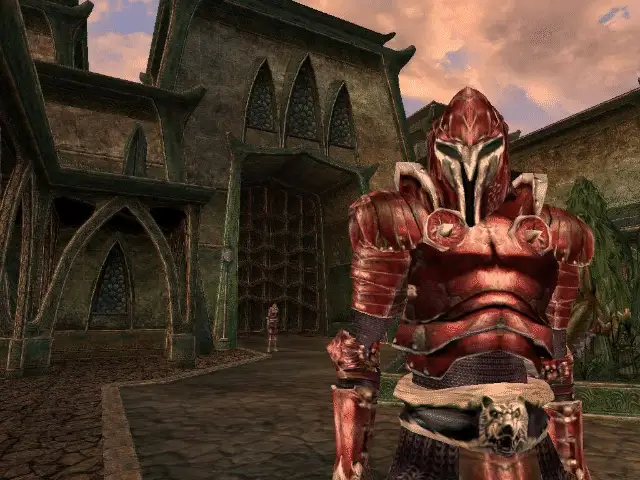
The Elder Scrolls III: Morrowind is an open-world fantasy role-playing game set in the richly detailed province of Morrowind, part of the Elder Scrolls universe. Originally released by Bethesda in 2002, it offers deep lore, open-ended gameplay, and a sprawling world filled with quests, factions, and exploration. This version runs on OpenMW, an open-source reimplementation of the Morrowind engine, offering improved stability and numerous enhancements while preserving the original gameplay experience.
Port Details
Genres
rpg
Requirements
!lowres
!crossmix
analog_2
Porter
Downloads
31574
Last Updated
2026-04-28
Rating
5/5, Ratings: 7
Miscellaneous
Instructions
Install "Morrowind Game of the Year Edition" from either Steam or GoG and copy the contents of Data Files into ports/openmw/data/.
Alternatively place the GoG offline installer files (setup_the_elder_scrolls_iii_morrowind_goty_1.6.0.1820_gog_0.1_(77582).exe and setup_the_elder_scrolls_iii_morrowind_goty_1.6.0.1820_gog_0.1_(77582)-1.bin) into ports/openmw/data/ and it will be installed correctly by the port when launched.
Additional Information
Controls
This port has extensive controls due to the complexity of Morrowind as a game. As a note, for full playability this port requires a device with dual analog sticks.
Basic Controls:
| Button | Action |
|---|---|
| D-pad | Movement (set speed) |
| Left Analog | Movement/Cursor |
| A | Select/Activate |
| B | Inventory/Back |
| X | Ready Weapon |
| Y | Ready Magic |
| L1 | Journal |
| L2 | Jump |
| L3 | Sneak |
| R1 | Rest/Wait |
| R2 | Attack/Cast Magic |
| R3 | Toggle 1st/3rd person |
| Start | Menu |
| Select | Cancel Cursor Mode |
Advanced Controls:
Hold Select with the following buttons for additional controls.
| Button | Action |
|---|---|
| D-pad Up | Previous Spell |
| D-pad Down | Next Spell |
| D-pad Left | Previous Weapon |
| D-pad Right | Next Weapon |
| A | Toggle HUD |
| Y | Screenshot |
| L2 | Backup Cursor/Debug |
| R2 | Text Entry |
| Select | End Cursor/Text Entry |
Text Entry:
In text entry mode (Select + R2) the following controls apply.
| Button | Action |
|---|---|
| D-pad Up | Previous Letter |
| D-pad Down | Next Letter |
| D-pad Left | Previous Space |
| D-pad Right | Next Space |
| A | Select Letter |
| B | Erase Letter |
| Y | Case Swap |
| Start | Enter |
| Select | End Text Entry |
Backup Cursor/Debug:
In Alternate Cursor mode (Select + L2), FPS and debug data can be accessed by pressing d-pad up to cycle through data. Please note, leaving debug data displayed will likely impact FPS!
| Button | Action |
|---|---|
| D-pad Up | FPS Debug |
| D-pad Down | Shader config |
| Left Analog | Movement/Cursor |
| A | Left mouse button |
| B | Right mouse button |
| R1 | Slow cursor mode (hold) |
Resolution Scaling
This port makes use of resolution scaling to achieve very stable FPS on all devices, from the R36S up through higher end handhelds. Resolution Scaling can be adjusted via openmw/openmw/settings.cfg. By default, Resolution Scaling is set to 0.5. This can be any number between 0.1 to 1.0 based on preference and device capability.
This can significantly impact performance, and a lower resolution scale can allow for significantly improved playability on low end devices.
Mods
OpenMW supports a wide variety of mods. Depending on your hardware you'll have varing levels of success in installing the more demanding mods. Some mods however can greatly improve performance and/or gameplay.
The PortMaster port will automatically handle the following mods, extracting them and installing them if they are placed into ports/openmw/mods/ fully zipped. By default we list the versions we have tested with, other versions may work.
It is highly recommended you install all the mods at once and not adding them piecemeal. If an unsupported mod is detected it will be placed into ports/openmw/mods_unused/.
Recommended performance/patch mods
- Project Atlas:
Project Atlas-45399-0-7-5-1747751438.7z - Morrowind Optimization Patch:
Morrowind Optimization Patch-45384-1-18-0-1751572864.7z - Patch for Purists:
Patch for Purists-45096-4-0-2-1593803721.7z
Other Mods
- Accurate Attack:
Accurate Attack -23746.rar - Better Bodies:
Better Bodies (Manual)-3880-2-2.7z - Better Heads:
Better Heads-42226-1-1.rar - Graphic Herbalism MWSE - OpenMW:
Graphic Herbalism MWSE - OpenMW-46599-1-04-1558643353.7z - OpenMW Containers Animated:
OpenMW Containers Animated-46232-1-2-2-1574060105.zip - Real Signposts:
Real Signposts-3879.zip - Weapon Sheathing:
WeaponSheathing1.6-OpenMW-46069-1-6-1565439130.7z
Manual Mod Installation
Other mods, as well as alternate versions of listed mods can be installed manually. Please follow the readme for the specific mods you're installing for general install directions. Due to the wide variety of mods for Morrowind, we cannot give detailed instructions to cover them all. That being said, the openmw/data directory performs the same as the Data Files directory in a standard PC installation of Morrowind, so you can install any manual mod normally with this in mind.
Once your mod is installed, you will need to direct the port to load it. This is done by editing ports/openmw/openmw/openmw.cfg. Scroll to the bottom of the cfg file and add content=modname.esp. Specify the mod's name and plugin type (.esp, .esm, .omwscripts or .omwaddon), as well as choose it's placement in the load order. Ensure all plugins load AFTER the Morrowind.esm, Tribunal.esm, and Bloodmoon.esm files by placing the plugins on lower lines.
Example config:
content=Morrowind.esm
content=Tribunal.esm
content=Bloodmoon.esm
content=Patch for Purists.esm
content=Patch for Purists - Book Typos.ESP
content=Patch for Purists - Semi-Purist Fixes.ESP
content=Better Heads.esm
content=Better Heads Tribunal addon.esm
content=Better Heads Bloodmoon addon.esm
content=Better Heads.esp
content=Better Heads Tribunal addon.esp
content=Better Heads Bloodmoon addon.esp
content=Better Bodies.esp
content=Lake Fjalding Anti-Suck.ESP
content=chuzei_helm_no_neck.esp
content=RealSignposts.esp
content=Containers Animated.esp
content=Accurate Attack.esp
content=takeall.omwscripts
Thanks
- Bethesda -- for this amazing game that continues to enthrall us after over 20 years.
- The OpenMW Team -- Creating an incredible engine and compiling for x86_64, making this port possible.
- kloptops -- Countless hours of compiling, troubleshooting, and packaging for aarch64.
- saint -- Configuring the port for playability, and being a constant source of information for Morrowind.
- BinaryCounter -- Helping out with
libcrusty.soand a customgl4esbuild with support for texture compression. - bmdhacks -- Giving excellent feedback during testing and helping with the resolution scaling memory leak.
- The Morrowind Modding Community -- Creating even more content for this already massive game.
- The Portmaster Testers -- Feedback, and assisting in the long journey this port has had to become possible.
Compiling
See BUILDING.md for building instructions.