Ittle Dew
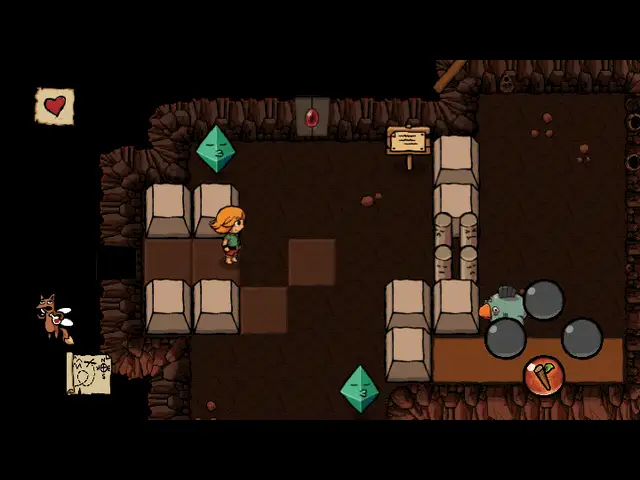
A short and sweet puzzle adventure. Ittle and her fairy fox Tippsie wash up on an island full of monsters, dungeons and treasure, and set out to find it all.
Port Details
Genres
action
adventure
puzzle
Requirements
Porter
Downloads
93
Last Updated
2026-10-12
Rating
None
Miscellaneous
Instructions
Any GOG or Steam version (Linux, Windows or Mac). GOG: copy the installer (.sh, .exe or .dmg) into ports/ittledew/gamedata. Steam: copy the game's files (Windows: dew.exe and dewData; Mac: IttleDew.app; Linux: IttleDew.x86 and IttleDewData) into ports/ittledew/gamedata.
Additional Information
Notes
Thanks to Ludosity for Ittle Dew, a Zelda-style adventure whose dungeons can often be solved in more than one way.
-
Any GOG or Steam version: Linux, Windows or Mac. The GOG Linux version is the best choice: it runs on its own player and gets a faster lighting effect.
-
Installation (GOG): copy the installer (Linux
gog_ittle_dew_2.0.0.2.sh, Windowssetup_ittle_dew_2.3.0.6.exeor Macittle_dew_2.1.0.8.dmg) intoports/ittledew/gamedata/and launch. Setup unpacks and deletes the installer. -
Installation (Steam): copy the game's files from Steam (Windows:
dew.exeanddew_Data; Mac:IttleDew.app; Linux:IttleDew.x86andIttleDew_Data) intoports/ittledew/gamedata/and launch. -
Windows, Mac and Steam builds have no Linux 64-bit program, so setup moves the data onto the port's own Unity 4.7.2 player (
donor.7z, a small game made for these ports) and converts it (tools/unity4convert). On Steam builds it also switches the game from Steam's saves to save files like the GOG version's, so no Steam client is needed. -
The first launch unpacks and patches the game (up to 10 minutes). Space needed: about 570 MB (about 320 MB on 1 GB devices). If setup fails, the reason is on screen and in
ports/ittledew/patchlog.txt. When it finishes, setup removes its own tools; to set the game up again (another version, for example), reinstall the port through PortMaster first. -
Korean: setup adds Korean to the game's languages (the Korean translation provided by MrGiKILL, thank you!), next to Japanese; choose it with the language (flag) button in the options. Japanese and Korean use Droid Sans Fallback as their font.
-
Textures: devices with 2 GB of RAM or more keep the full-size textures; on 1 GB devices setup halves the large ones to fit in memory.
-
Knulli on 1 GB devices with a PowerVR GPU (e.g. TrimUI Smart Pro) needs zram (compressed swap): Knulli has no swap and no menu setting for it, and without it the game runs out of memory. As root (over SSH), once per boot, or put these lines in
/userdata/system/custom.shto run them at boot:modprobe zram && echo lzo > /sys/block/zram0/comp_algorithm && echo 256M > /sys/block/zram0/disksize mkswap /dev/zram0 && swapon /dev/zram0muOS does not need this: the game ran on a 1 GB PowerVR TrimUI Brick under muOS with swap switched off.
-
The game is shown at 16:9 on every screen, centered with black bars on 4:3, 3:2, 16:10 and square screens.
-
On Knulli and muOS the
performanceCPU governor (in the firmware's menus) makes the game noticeably smoother. -
Saves:
ports/ittledew/conf/.config/unity3d/Ludosity/IttleDew/IttleDew/. Logs:log.txt,unity.logandpatchlog.txtinports/ittledew/.
Controls
The game's own Xbox 360 controls, through a virtual Xbox pad. A, B, X and Y are the letters in the game's button pictures. On dArkOS they match the printed buttons; Knulli maps by position, and its per-game "Switch A/B and X/Y" setting makes them match.
| Button | Action |
|---|---|
| Left stick / D-pad | Move |
| A | Stick / fire sword, confirm |
| B | Ice wand, back |
| X | Portal block |
| Y | Portal wand |
| L1 | Ask Tippsie for a hint |
| R1 | Map |
| Start | Pause |
| Select + Start | Quit |
Compile
The port runs the game's own Unity 4 player (GOG Linux), or the other builds' data on a Unity 4.7.2 Linux player, with box64 and gl4es, on small X11/GLX stand-ins for the firmware's SDL2. Sources of everything built for the port are in ittledew/tools/src/, and the build steps in ittledew/tools/src/BUILDING.md.